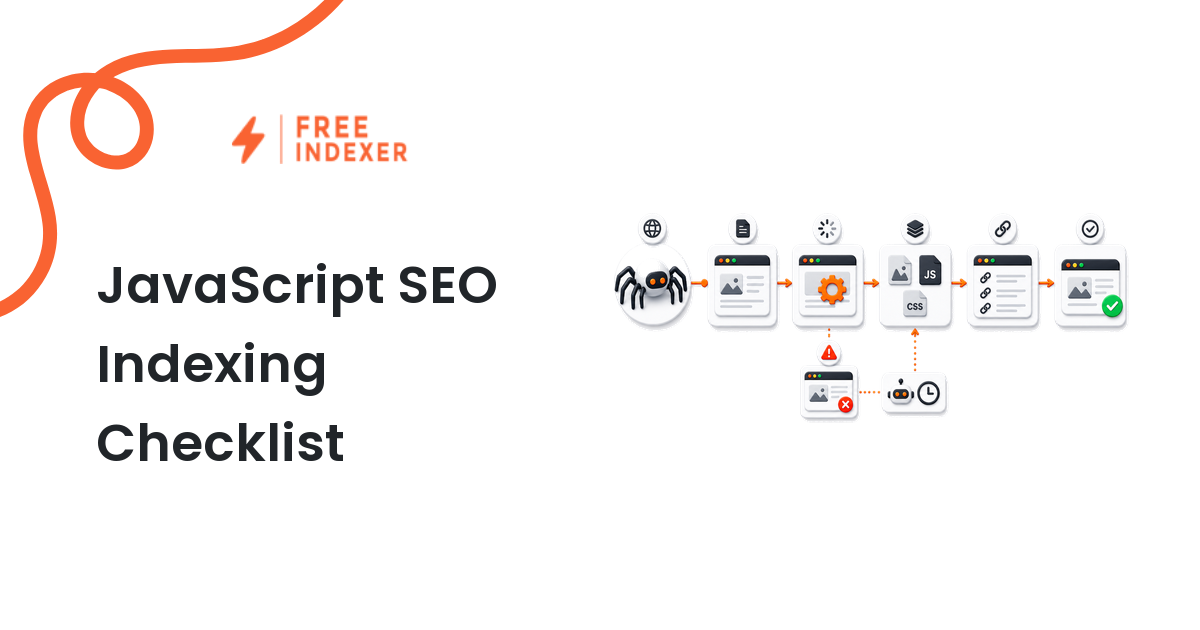
Test whether JavaScript-rendered pages expose important content, links, canonicals, and directives before they enter an indexing workflow.
For webmasters, the practical goal is simple: Verify rendered content and links before submitting JavaScript-heavy URLs for discovery.
Related FreeIndexer reading:
- Javascript SEO Indexing Checklist
- Technical SEO Foundations For Ai Search
- Crawlability Audit Workflow
The Operating Rule
JavaScript indexing tests should answer whether the important page state is visible to crawlers, not whether the page looks fine in a logged-in browser. Review raw HTML, rendered output, links, canonicals, directives, and failure states before deciding the URL is ready.
Technical Signals To Review
- Primary content appears in rendered output without requiring user interaction, login, or blocked resources.
- Internal links use crawlable anchors and resolve to final canonical URLs.
- Canonical and robots directives remain consistent between raw and rendered states.
- Hydration errors, API failures, or delayed content do not hide the page's main purpose.
Implementation And Audit Table
| Step | Control | Evidence | Implementation Decision |
|---|---|---|---|
| 1 | Compare raw and rendered | Primary copy, headings, links, and structured sections | Decide whether crawlers can see the meaningful content. |
| 2 | Check directives | Canonical, noindex, robots meta, and HTTP headers | Avoid changing directives unexpectedly during rendering. |
| 3 | Test resources | Blocked scripts, failed API calls, and console errors | Fix dependencies that prevent content from loading. |
| 4 | Inspect links | Anchor elements, hrefs, and final URLs | Expose crawlable internal links without click-only routing. |
| 5 | Submit ready URLs | Validated rendered evidence and final URL | Use submission after rendering QA passes. |
Apply the rule consistently at template or system level. A clean implementation should make the intended page state obvious to users, crawlers, sitemaps, internal links, and reporting tools.
Practical Scenario
A React product page renders a beautiful comparison table for users, but the crawler view shows only a loading shell because the API blocks unauthenticated requests. The solution is rendering/access work, not another indexing request. After the table appears in the rendered output, the page can enter the queue.
Failure Modes To Avoid
- Testing only in a logged-in browser session.
- Ignoring differences between raw HTML and rendered HTML.
- Letting client-side routes create links with no crawlable href.
- Submitting JavaScript URLs before checking blocked resources or hydration errors.
Where FreeIndexer Fits
FreeIndexer can manage JavaScript-heavy URLs after the rendered evidence is clean. Keep failed rendering samples in an engineering QA queue.
Implementation Notes For Each Step
1. Compare raw and rendered
Capture primary copy, headings, links, and structured sections before making a conclusion. Decide whether crawlers can see the meaningful content.
Keep the evidence tied to the exact canonical URL and the date of the check. If the issue affects a shared template or URL pattern, record the pattern as well so the team fixes the system instead of repeating the same manual task.
2. Check directives
Capture canonical, noindex, robots meta, and http headers before making a conclusion. Avoid changing directives unexpectedly during rendering.
Keep the evidence tied to the exact canonical URL and the date of the check. If the issue affects a shared template or URL pattern, record the pattern as well so the team fixes the system instead of repeating the same manual task.
3. Test resources
Capture blocked scripts, failed api calls, and console errors before making a conclusion. Fix dependencies that prevent content from loading.
Keep the evidence tied to the exact canonical URL and the date of the check. If the issue affects a shared template or URL pattern, record the pattern as well so the team fixes the system instead of repeating the same manual task.
4. Inspect links
Capture anchor elements, hrefs, and final urls before making a conclusion. Expose crawlable internal links without click-only routing.
Keep the evidence tied to the exact canonical URL and the date of the check. If the issue affects a shared template or URL pattern, record the pattern as well so the team fixes the system instead of repeating the same manual task.
5. Submit ready URLs
Capture validated rendered evidence and final url before making a conclusion. Use submission after rendering QA passes.
Keep the evidence tied to the exact canonical URL and the date of the check. If the issue affects a shared template or URL pattern, record the pattern as well so the team fixes the system instead of repeating the same manual task.
Turn The Findings Into An Action Queue
A diagnostic result is useful only when it changes what the team does next. Move each URL into one of four clear queues:
- Ready: the URL is useful, canonical, public, technically accessible, and ready for submission or normal monitoring.
- Fix: the URL has a correctable technical, content, linking, rendering, or reporting problem with an assigned owner.
- Exclude: the URL is intentionally redirected, noindexed, removed, duplicate, private, or otherwise outside the indexing target set.
- Escalate: the issue affects infrastructure, templates, migrations, security controls, or a large URL cohort and needs engineering or product input.
For this topic, the release rule is: Verify rendered content and links before submitting JavaScript-heavy URLs for discovery. Do not leave a URL in a vague pending state. Give it an owner, one next action, and a review date based on the evidence available.
Evidence Log To Keep
| Field | What To Record | Why It Matters |
|---|---|---|
| Canonical URL | The final normalized URL checked by the operator | Prevents variants and redirects from splitting the investigation. |
| Cohort | Page type, template, campaign, locale, or backlink group | Reveals whether the issue is isolated or systemic. |
| Evidence source | Live response, URL Inspection, crawl, log, sitemap, or provider record | Makes the conclusion reproducible. |
| Change made | The exact technical, content, link, or workflow update | Separates action from assumption. |
| Owner and review date | Who is responsible and when the URL will be checked again | Stops the queue from becoming passive reporting. |
Keep submission dates in their own field. A submitted URL has completed an operational step; it has not automatically completed crawling, indexation, ranking, traffic, or conversion milestones. That separation makes the report more accurate and makes failed outcomes easier to diagnose.
Final Action Checklist
- [ ] Compare raw and rendered: Decide whether crawlers can see the meaningful content.
- [ ] Check directives: Avoid changing directives unexpectedly during rendering.
- [ ] Test resources: Fix dependencies that prevent content from loading.
- [ ] Inspect links: Expose crawlable internal links without click-only routing.
- [ ] Submit ready URLs: Use submission after rendering QA passes.
- [ ] Confirm the final URL and evidence date in the tracking sheet.
- [ ] Remove excluded or unresolved URLs from the active submission batch.
- [ ] Schedule one follow-up review instead of repeating untracked checks.
Primary Sources
FAQ
Does Google render JavaScript?
Google can process JavaScript, but pages should still make important content and links reliably accessible.
Should every JavaScript page use server-side rendering?
Not always. The right solution depends on the page, but critical content must be reliably available.
Can FreeIndexer fix rendering issues?
No. FreeIndexer should be used after rendering and discovery checks pass.
Next Step
Verify rendered content and links before submitting JavaScript-heavy URLs for discovery.
Keep the final report honest: document what was fixed, what was submitted, what evidence changed, and what still requires time or a separate SEO decision.